1. Introducing the Scenario
Scenario: Deduplicating URLs at the Hundred-Million Scale
Take large-scale web crawling as an example. When a crawler targets a specific keyword, the number of URLs to fetch can reach hundreds of millions. Duplicate URLs not only waste crawling resources but can also send the crawler into an infinite loop or make it fetch useless pages, seriously hurting crawl efficiency and data quality.
Traditional Approaches
- Store them in a database and add a unique constraint
- I/O bottleneck
- Use a cache such as a HashSet
- High memory overhead
Optimizing the Approach
Since deduplicating a URL crawler can tolerate false positives, and with such large data volumes a small number of mistakes is perfectly acceptable:
- Use a bitmap with single-hash compressed storage, using a binary array to record whether a URL has appeared, which takes up much less memory
- Memory estimate for ten billion URLs at a false positive rate: with items, the bitmap is in size, using
- Optimize the bitmap further—this is the Bloom filter. It uses multiple ($k$) hash functions to map each element onto multiple ($k$) bits in the binary array, representing one element with several bits
2. Bloom Filter Basics
Concept
A Bloom filter is a probabilistic data structure built on a bit array. It can efficiently tell you that an element "might be present" or "definitely isn't present".
- Space efficient: it stores data in a bit array, saving a great deal of space.
- Fast queries: insertion and lookup both run in constant time , where is the number of hash functions.
- Possible false positives: it can misjudge, i.e. it may report an element that was never inserted as being present (a false positive), but it will never misjudge an element as absent.
Diagram
Initializing a Bloom filter
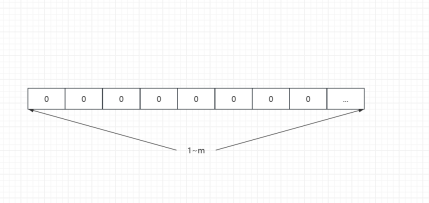
image.png|500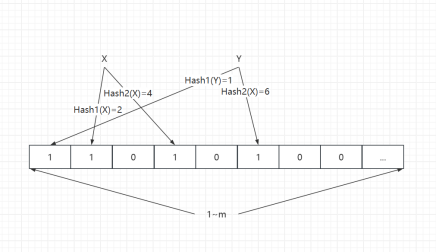
image.png|500
Querying: definitely absent vs. possibly present
Definitely absent: query and insert Z. When Z is queried, one bit is found to be 1 while the other is 0, which proves it definitely isn't present.
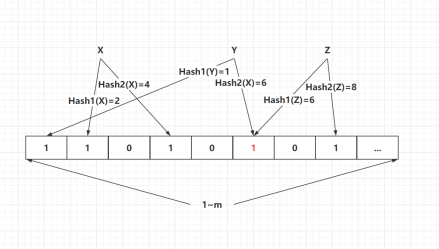
image.png|500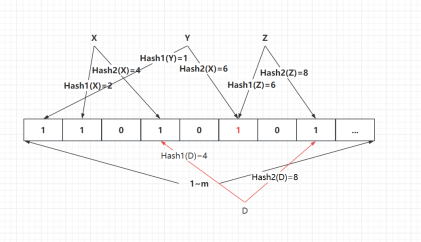
image.png|500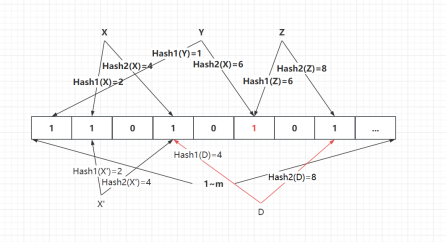
image.png|500
Parameters
Parameter meanings
- Number of elements to insert,
- Length of the bit array,
- Number of hash functions,
- False positive rate,
Derivation
- Probability that a given bit is still after inserting element with hashes:
- Probability that a given bit is still after inserting elements with hashes:
- Probability that a given bit has been set to after inserting elements with hashes:
- Probability that all the bits produced by hashes of one inserted element have already been set to :
- From this we can derive the false positive rate
Estimating parameters Given the number of insertions and the false positive rate :
- Bit array length
- Number of hash functions
Characteristics
Insert and query, but no delete Clearly a Bloom filter can't support deletion, because multiple elements may hash to the same location in the filter—see the diagram above.
Space usage Memory estimate for ten billion URLs at a false positive rate:
- Bitmap: length , using
- Bloom filter: bit array length , using about
3. Bloom Filters in Practice: Using Guava
In real projects you'll usually use the Bloom filter from Google's Guava library. Guava Maven repository
A Small Example
Add the Guava dependency
The core Bloom filter methods in the Guava library:
put(): insert an elementmightContain(): check whether an element might be present
Example
Insert items and query items; were misjudged.
4. A Deep Dive into the Guava BloomFilter Source Code
The BloomFilter Class
It wraps the core Bloom filter logic—adding and querying elements, computing initialization parameters (such as bit array size and number of hash functions), and so on.
- create(Funnel, int, double): the lightweight user-facing API
- create(Funnel, long, double): the advanced API
- create(funnel, expectedInsertions, fpp, Strategy): the core implementation
The factory creates a BloomFilter
Core methods
The Funnel interface
The Funnel interface's main job is to "inject" an object's state into a PrimitiveSink, producing a continuous byte sequence—that's what makes it possible to use a Bloom filter with custom structures.
public interface Funnel<T> {
    void funnel(T from, PrimitiveSink into);
}
- T from: the object to convert.
- PrimitiveSink into: the container that receives the object's data. PrimitiveSink provides many methods for writing primitive types and strings into one unified byte stream.
Guava ships with built-in funnels such as integerFunnel(), stringFunnel(Charset), byteArrayFunnel(), and so on.
Example
Goods
@Data
@AllArgsConstructor
public class Goods {
    private final int id;
    private final String name;
}
PojoBloomFilter
What Funnel does
- Ensures consistency: Funnel guarantees that the same structure gets the same preprocessing before hashing.
- Controls granularity: for a custom class, if you want to use a Bloom filter, you can pick which fields to inject—for example, inject Goods' id and name.
The Strategy Interface (default implementation: MURMUR128MITZ64)
The Strategy interface defines the Bloom filter's hashing strategy plus the concrete operations for inserting and querying elements. The default is MURMUR128MITZ64.
- MURMUR128: the 128-bit variant of MurmurHash3
- MITZ: named after Google engineer Mitz Pettel, who devised the "double hashing" trick described below
- 64: uses 64 bits each time
You'll notice it doesn't really use hash functions; the implementation computes one hash and splits it into two fields. "Less Hashing, Same Performance: Building a Better Bloom Filter" proposes an optimization: you only need to compute two independent hash functions to build a Bloom filter equivalent to one using many hash functions. $$gi(x)=h1(x)+i·h_2(x)$$
The index passed into the BitArray is index = (combinedHash & Long.MAX_VALUE) % bitSize), the purpose being to make combinedHash positive—otherwise you can't take the modulo by bitSize (a negative index would throw an exception).
The BitArray Module
BitArray is the heart of the Bloom filter's low-level implementation, responsible for storing and managing the bit array.
- Uses a long (64-bit) array
- bitCount is the number of bits set to ; the native Long.bitCount() method is used to gauge how full the filter is
- In get, the index is logically shifted right to get the long element index, and an AND is used to get the specific bit index after the modulo
- set uses compareAndSet for atomic updates
- putAll ORs two BitArrays together, used for merging Bloom filters
5. Bloom Filter Variants
Counting Bloom Filter
- Adds delete operations on top of an ordinary Bloom filter
- Done through bit counting
- Drawback: it takes up more space
Bloomfilter
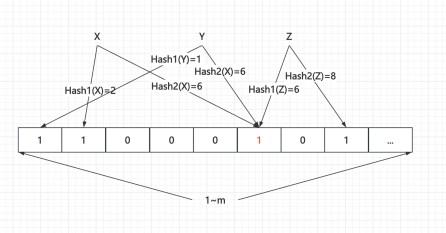
image.png|500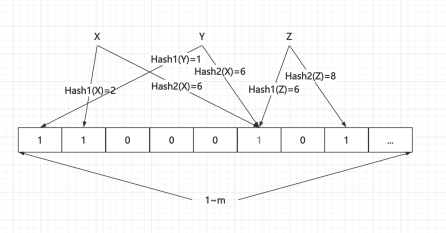
image.png|500
Periodically Rebuilding the Bloom Filter
- Rebuild periodically
- Delete the old Bloom filter
- Rebuild a new Bloom filter
6. Real-World Scenarios
Product IDs at Large Scale
- A user requests a product
- Unlike URL filtering for a crawler, a mistake isn't allowed
- Use a database?
- Use a cache?
- Use a Bloom filter?
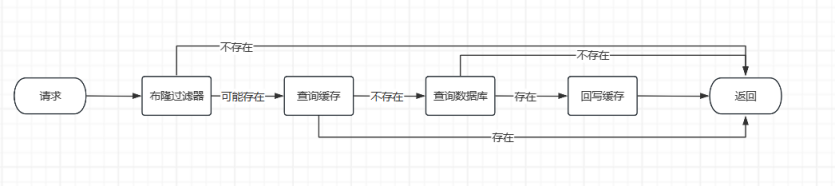
image.png|700