The shell takes user commands and passes them to the OS for execution.
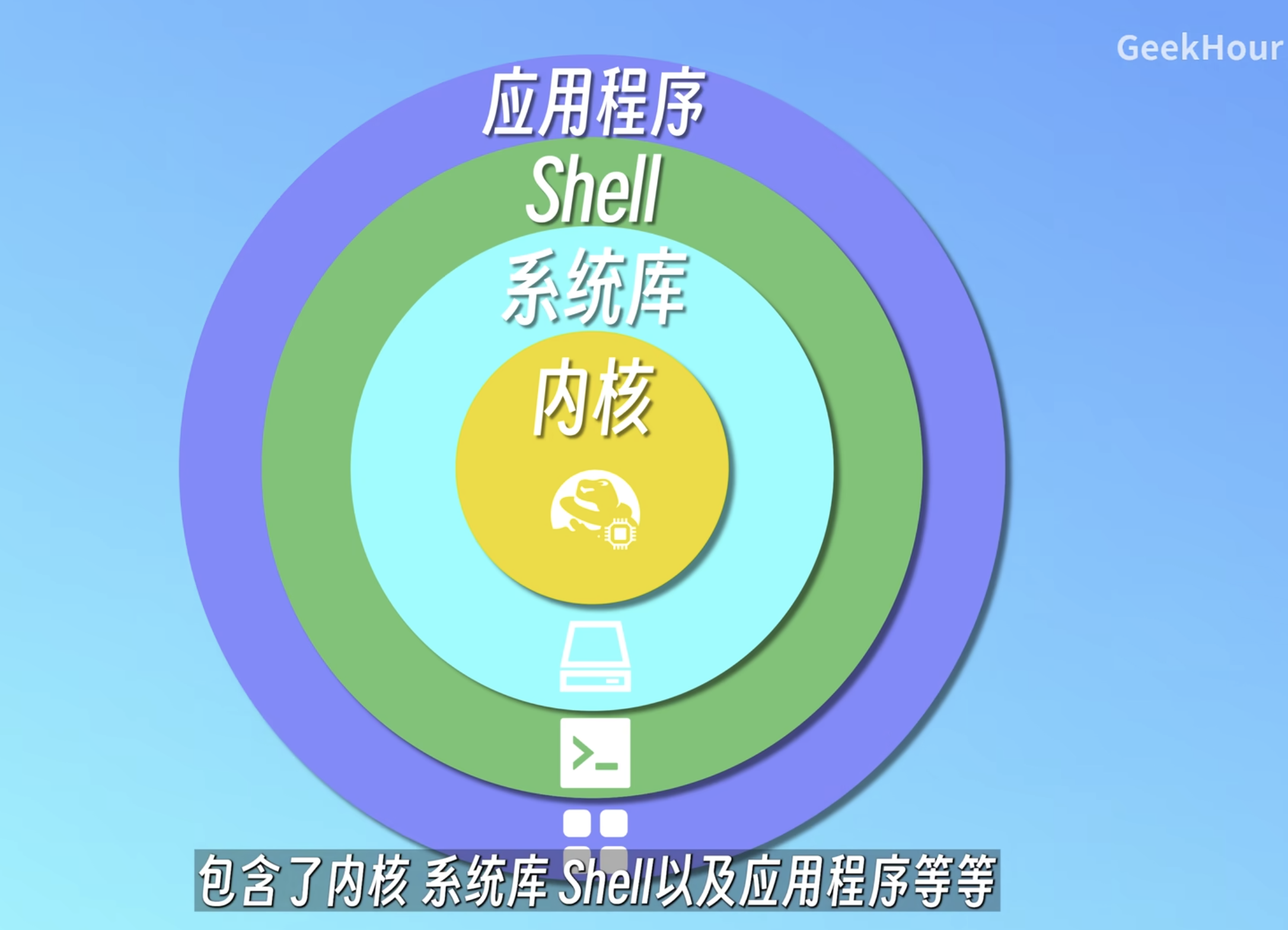
image.png|500
Basic Navigation and Viewing
pwd
pwd displays the absolute path of the current directory.
---
ls
ls (list) lists the files in the current directory.
Options:
-l lists each file's attributes; there is usually an alias ll for it.
--- Attribute details:
- File type:
-: regular file (e.g.1.txt)d: directory (e.g.test)l: symbolic linkc: character device fileb: block device files: socket filep: named pipe ---
- File permissions:
- The permissions are divided into three groups of three characters, representing the file owner, the group, and other users.
- Each group uses
rwxfor read, write, and execute permissions; missing permissions are indicated by-. For compact notation,r\w\xare assigned the numbers4\2\1. ---
- Hard link count:
- For a file, it indicates how many filenames point to that file's
inode. - For a directory, it is usually 2 plus the number of subdirectories; every directory has
.pointing to itself and..pointing to the parent directory. ----alists all files, including hidden files.. .. .env 1.txt test--- ### cdcdenters a directory. As mentioned earlier,..stands for the parent directory.cd -goes back to the last directory you were in. --- ### treetree []displays the structure below directory[]. --- ## File and Directory Operations --- ### touchtouchupdates the timestamp, but it can also create files. --- ### mkdirmkdircreates a directory. --- ### catcatoutputs the contents of a file. --- ### lesslessdisplays a file; you can scroll up and down and pressqto quit. It reads and displays only what the screen needs.ggoes to the beginning,Gto the end.%orpjumps by percentage./patternsearches forward,?patternsearches backward;ngoes to the next match,Nto the previous match.Fkeeps watching new content appended to the end of the file, liketail -f. --- ### moremoredisplays a file but cannot scroll back up; pressqto quit. It loads the entire file into memory at once and then displays it. --- ### headheadoutputs the beginning of a file.head --lines=n fileoutputs the firstnlines offile. --- ### tailtailoutputs the end of a file.tail --lines=n fileoutputs the lastnlines offile.tail -fkeeps viewing new content as it is appended. --- ### cpcp 源 目的copies files or directories. --- ### mvmv 源 目的moves, and can also be used to rename. --- ### rmrmdeletes.rm -rdeletes recursively; used for directories. --- ### lnlnlinks.ln -s 源 目的creates a soft link: it does not store the file, only a shortcut file.ln 源 目的creates a hard link: a pointer to the source file that shares the sameinode; you can think of it as a reference, and it can only point to files. --- ## Permissions and Searching --- ### chmod Modify permissions.u\g\orepresents the three permission groups.chmod u+x filegives the owner execute permission. You can also use numeric permissions, e.g.,chmod 744 file. --- ### filefiletells you the file type, e.g.,1.txt: ASCII text. --- ### where/which/whereiswherefinds where a file is. --- ## Output, Pipes, and Editing --- ### echoechooutputs to the command line; wrap special characters in" ".>redirects standard output to a file, e.g.,echo "1" > 1.txt.>>appends to a file.<redirects standard input from a file. --- ### pipecommand1 | command2 | command3feeds one command's standard output to another command's standard input.ls -l | grep "*.txt"cat blog.log | grep "ERROR" | less--- ### nanoCrtl+Xexits,Crtl+Osaves. --- ### vim In command mode,:wqsaves and exits,:q!force quits;[n]yycopies n lines,[n]ppastes n times below the cursor, andddcuts. In command mode, typei\a\o\I\A\Oto enter insert mode; in insert mode,escenters command mode. ---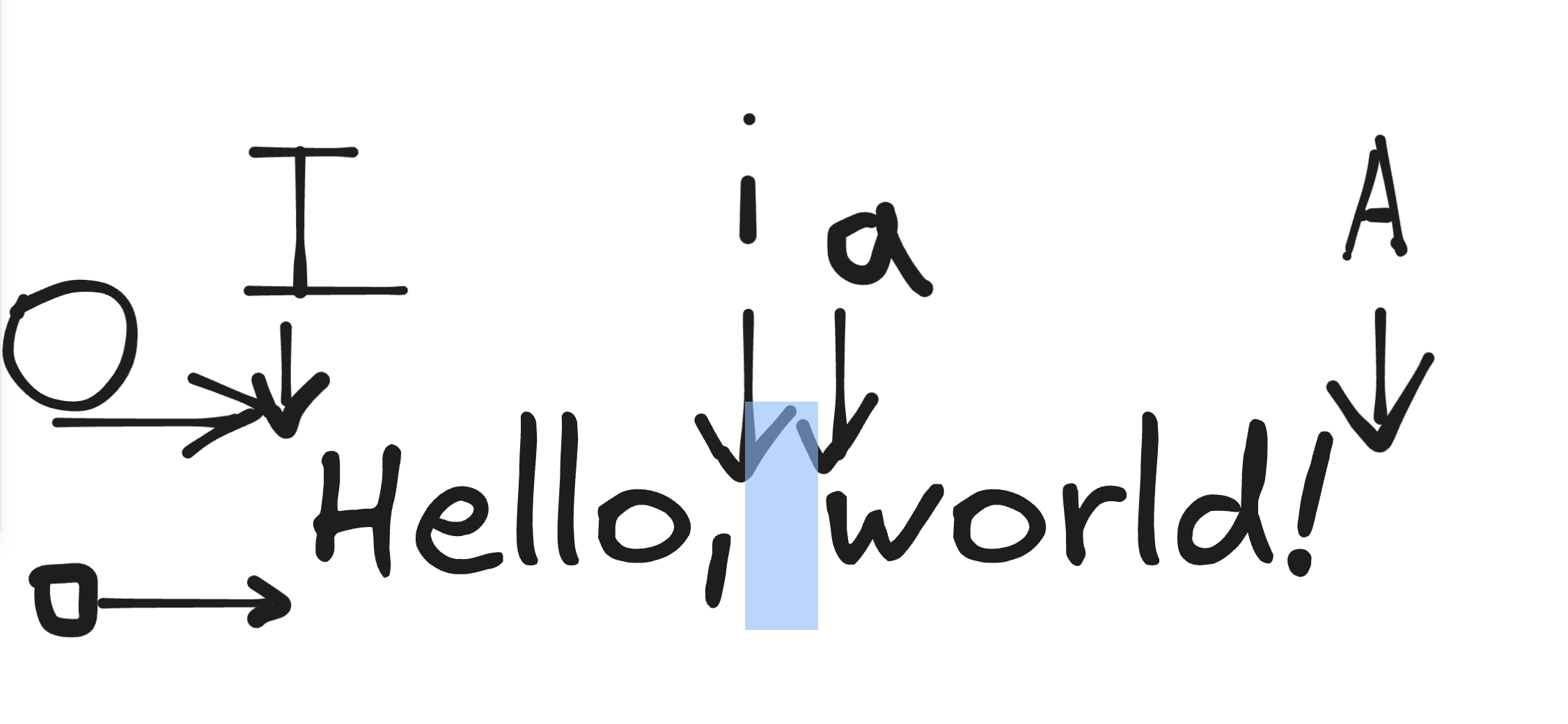
image.png|500
- For a file, it indicates how many filenames point to that file's
In insert mode, ^ jumps to the beginning of the line and $ to the end of the line.
---
In command mode, typing : enters command-line mode; in command-line mode, esc\enter returns to command mode.
---
Variables and Wildcards
---
Shell
Define a variable with variable=value and it's done. You can view it with echo ${variable}. The braces are used to prevent ambiguity.
Trim from the front: for example, ff=week01, echo ${ff#week} outputs 01. Use % to trim from the end.
? is a placeholder for one character, * for any characters.
---
for i in $(seq 1 10) iterates over the sequence 1 to 10.
for ((i=0;i<10;i++)) is a C-style loop.
Batch rename
for> do
for> mv ${d} chapter${d#week}
for> done