0. Step: Why Do We Need RAG?
When we press Enter in ChatBox and send a query like “Can the excess credits earned beyond the required core general education courses at the University of Electronic Science and Technology of China be converted into autonomous elective credits?” the predictable result is that we won’t get a useful answer: in ChatGPT Web, GPT 5.2 Thinking uses its powerful search ability to look through school documents and campus forum posts, and finally concludes “No”; DeepSeek in ChatBox just makes something up.
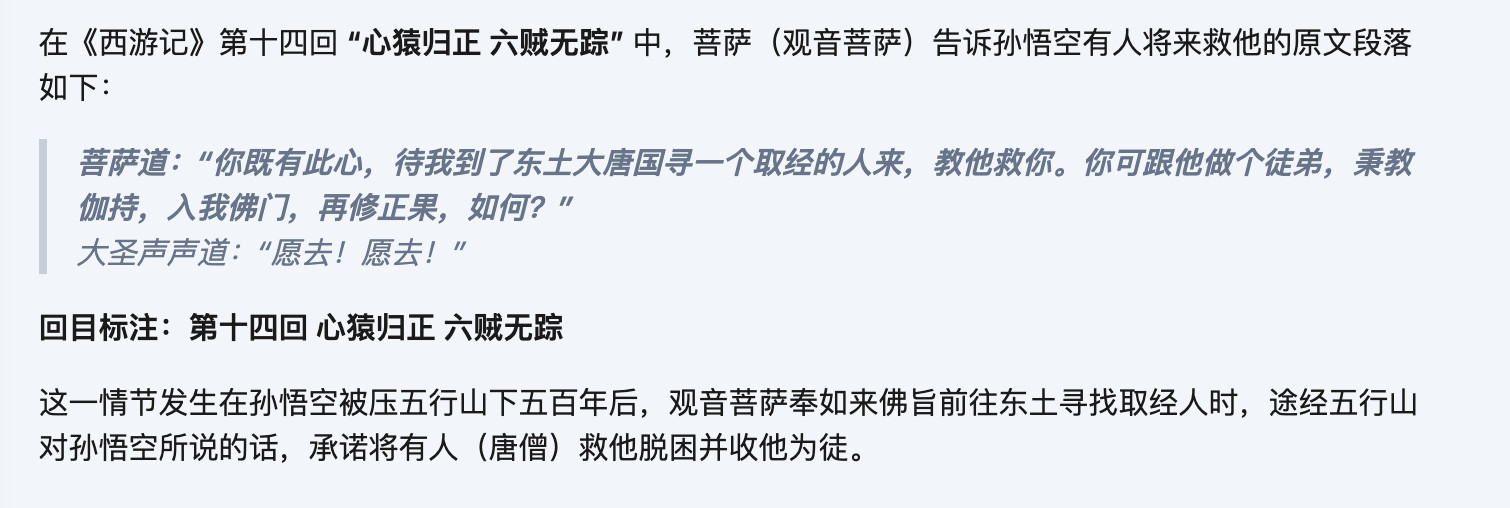
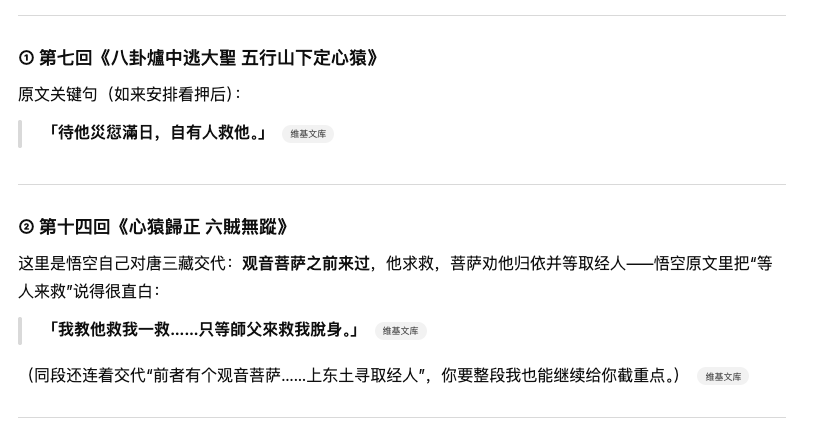
Another example: ask the AI “the original sentence or paragraph in which Guanyin tells Sun Wukong that someone will save him, and mark the chapter title.” This is a very specific question: in ChatGPT Web, it thinks for over two minutes, checks 106 web pages, and answers off the point, as if it didn’t understand the question.
What we want is the passage in “Chapter 8, The Buddha Creates the Scriptures and Spreads Bliss; Guanyin Goes to Chang'an by Imperial Decree”: “The bodhisattva heard this and was overjoyed. She said to the Great Sage, ‘The holy scripture says: “If your words are good, they will be echoed from a thousand li away; if your words are not good, they will be opposed from a thousand li away.” Since you have this intention, when I reach the great Tang in the east and find a scripture pilgrim, I will have him save you. You can be his disciple, uphold the faith, enter our Buddhist gate, and cultivate the right fruition again—how about it?’ The Great Sage said again and again, ‘I will go! I will go!’”
Books like Journey to the West are commonly included in training data, yet even so, the model still cannot accurately provide exact information. And relying on web search doesn’t necessarily handle factual answers well either.
Introducing RAG can help solve such problems:
A lack of domain-specific or private knowledge: some specialized knowledge was never included in training, or it lives in an internal knowledge base that the model cannot access.
Knowledge has a cutoff date: the model cannot get the latest knowledge.
We only need the school’s official curriculum manual to supply credit-related knowledge; we only need the complete novel to retrieve semantically similar passages.
1. Intro: What Is RAG?
RAG stands for Retrieval-Augmented Generation, a technique that combines information retrieval with LLMs. It retrieves relevant information from a knowledge base—such as internal documents, databases, and so on—to “augment” the LLM’s generation ability, making its answers more accurate, timely, and relevant to specific domains or private data, without retraining the entire model. This effectively addresses the knowledge limitations and “hallucination” problems of large models.
As the name suggests, it is divided into three stages: retrieval, augmentation, and generation.
Retrieval: when the user asks a question, the system searches the knowledge base for relevant information fragments.
Augmentation: the retrieved information is combined with the user’s original statement to form an augmented prompt.
Generation: this augmented input prompt is handed to the LLM to generate a more accurate, better-supported answer.
2. A Simple RAG
截屏2025-12-28 13.43.06.png|500
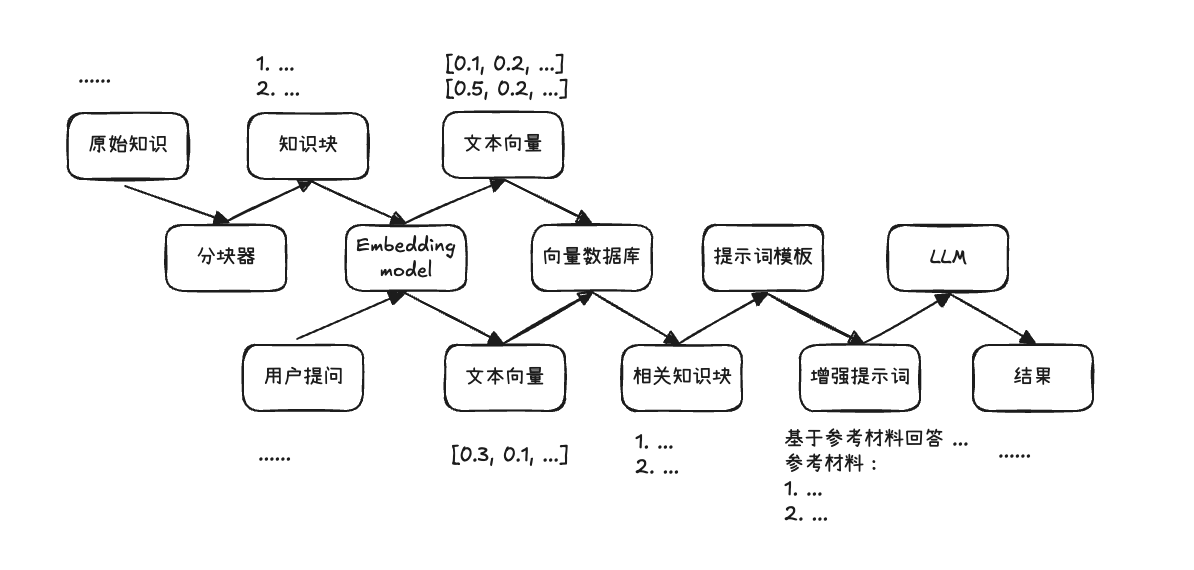
The figure above shows the most basic RAG pipeline.
It is divided into three stages:
Indexing stage: split the original knowledge documents into chunks and convert them into vector format.
Retrieval stage: convert the user query into vector format and look up the most relevant document chunks.
Generation stage: produce an “accurate” answer based on the retrieved information.
2.1 Indexing Stage
The indexing stage splits the original knowledge document into chunks and converts them into vector format through an embedding model, then stores them in a vector database for retrieval.
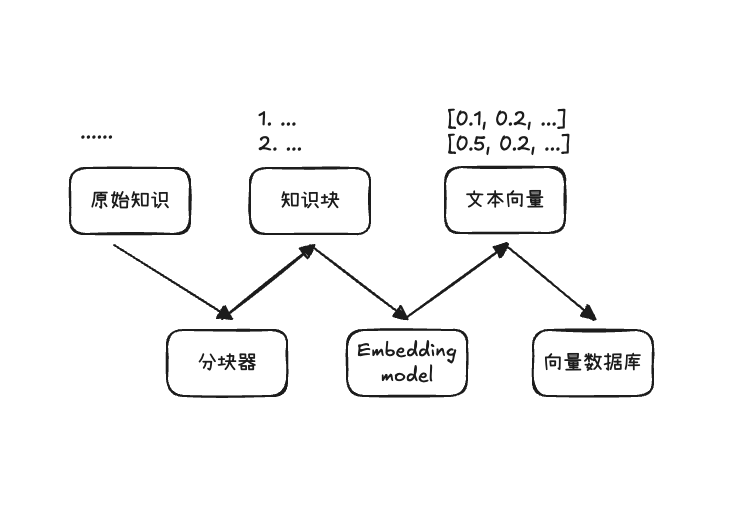
截屏2025-12-28 13.49.20.png|500
2.1.1 Splitting Documents
Splitting documents divides the original knowledge document into text chunks using different splitting strategies.
The core requirement is semantic coherence.
Common splitting strategies include:
- Split by a fixed number of characters or tokens
- Split by punctuation
- Split by sentences
- Split by paragraphs
- Split by semantics
- Overlapping split
In short, there are many options; the main point is to split the document appropriately into small chunks according to its type, while keeping the semantics coherent.
2.1.2 Text Embedding
The purpose of text embedding is to convert the split text chunks into a numerical representation that is easy for computers to compute with—that is, a vector.
Simple methods include: binary bag-of-words, count-based bag-of-words, and TF-IDF.
The bag-of-words method first extracts tokens from the corpus and treats each token as a dimension.
Binary bag-of-words: if the text contains the token, the dimension corresponding to that token is recorded as 1; otherwise it is 0.
Count-based bag-of-words: the dimension for each token records how many times that token appears in the text.
TF-IDF: on the basis of term frequency, inverse document frequency is introduced for weighting. Common words with low discriminative power are downweighted, while words that better reflect differences between texts are given higher weights.
But in any case, their use of dimensions is too sparse. For a novel, there may be hundreds of thousands of tokens—that is, a vector may have hundreds of thousands of dimensions. But for a particular chunk, most of the dimensions are 0 and only a few have values. Hence dense vectors came into being.
Dense vectors—which are what the embedding models we use today produce—compress the meaning of a text into a numerical space with fixed dimensions. Each dimension no longer corresponds to a specific token; it simply uses fewer dimensions to express semantic features. They can capture that “happy” and “glad” are synonyms, and know the relationship between Beijing and China, or Paris and France.
In our use, we only need to input the text into an embedding model to get the corresponding text vector.
You can choose a suitable model on the HuggingFace leaderboard, such as:
Qwen3-Embedding-8B
gemini-embedding-001
2.1.3 Vector Storage
After obtaining the text vectors, we also need a place to store them, and a corresponding retrieval method. So we usually use a vector database to store these vectors.
A vector database supports storing vectors and provides similarity-based vector retrieval, such as TopK nearest-neighbor queries, to quickly find the content most relevant to the query from a huge number of chunks.
A vector database generally stores three types of information:
- The vector itself: the embedding vector of the chunk
- The original content: the chunk, used to be directly concatenated into the augmented prompt
- Metadata: stores data such as the source document, chapter, table of contents, page number, offset, and time labels
There are many vector databases too; you can search for suitable ones, such as:
Chroma
Qdrant
2.2 Retrieval Stage
The retrieval stage converts the user’s query into a text vector and looks up the most relevant document chunks.
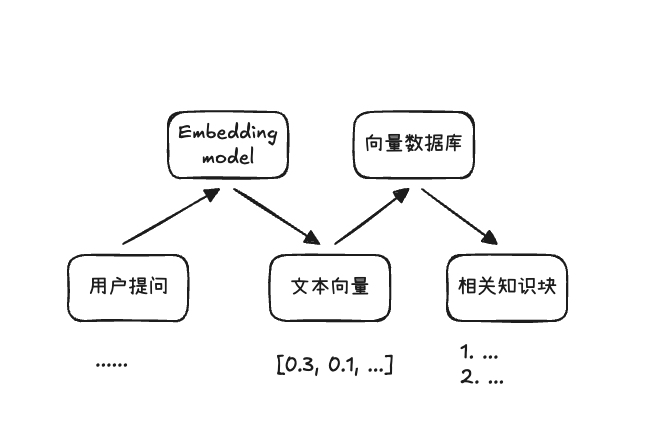
截屏2025-12-28 14.33.51.png|500
Since we have already encoded text semantics into vectors, retrieval based on text similarity is essentially about how close two vectors are. Common methods are mainly: cosine similarity, Euclidean distance, and dot product.
Cosine similarity focuses on whether the directions of two vectors are aligned, namely their cosine value, with a range of [-1, 1]. The closer it is to 1, the more aligned the directions are.
Euclidean distance focuses on the straight-line distance between two vectors in space; the smaller the distance, the more similar they are.
Dot product is affected by both direction and length: the more aligned the directions and the longer the length, the larger the dot product tends to be.
In addition, there is keyword-based retrieval, which extracts keywords from the user’s query and matches corresponding documents. It is more effective in some scenarios, but we won’t go into it here.
2.3 Generation Stage
The generation stage concatenates the context retrieved in the previous step with the user’s query to form an augmented prompt, and hands it to the LLM so that it can produce an “accurate” answer with evidence.
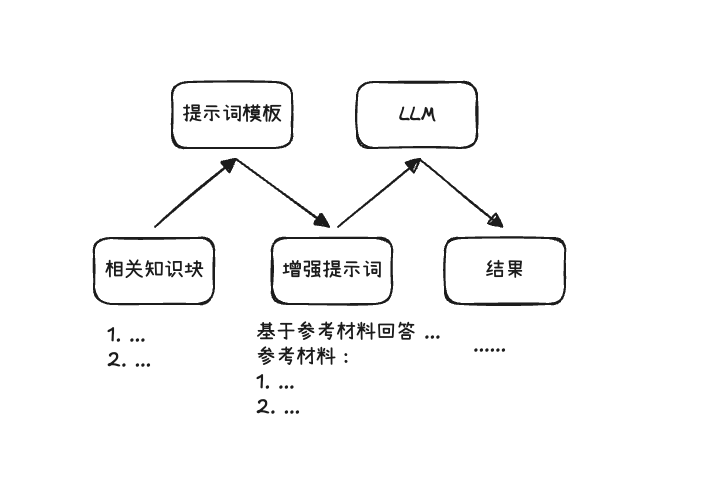
截屏2025-12-28 14.46.43.png|500
There is not much to say about this stage; the main task is to select and organize the context, that is, concatenate the retrieved chunks with the user’s query, and finally hand it to the LLM.
But it also involves some optimizations, for example:
- When different retrieval methods produce different topK chunk results, how to filter more appropriate topK chunks
- How to make the prompt template clearer and more specific
- How to get the LLM to correctly cite relevant evidence when generating an answer
2.4 Hands-On Practice
We have finished the theory of simple RAG. Next, let’s build a simple novel-Q&A RAG from scratch, using the Journey to the West question from the beginning as an example.
I used LM Studio to run the embedding and LLM services locally; it provides an OpenAI-compatible API.
I used text-embedding-qwen3-embedding-0.6b and qwen/qwen3-4b-2507 as the models for this hands-on practice.
Install the following dependencies: pip install openai chromadb
Among them, chromadb is an open-source vector database, and openai is added for convenient API access.
Indexing stage
For chunking, first use the heading format “第 xx 回” to split the novel into chapters, and then apply overlapping splitting within each chapter: split by CHUNK_SIZE, but the starting point moves forward by OVERLAP each time. That is, if a chapter has 2500 characters, the chunks are [0, 800), [650, 1450), [1300, 2100), [1950, 2750), [2600, none), and the last chunk is empty and filtered out.
Then vectorize each chunk and add it to the vector database; meta_data can carry the chapter title.
Distance metrics include: cosine, l2, ip—cosine similarity, Euclidean distance, and dot product.
Here we choose cosine similarity. chromadb requires you to decide the metric when creating the collection.
Retrieval stage
Vectorize the user query and look up the topK most similar results in the vector database.
Generation stage
Concatenate the user message and the retrieved context to form an augmented prompt, and hand it to the LLM to generate an answer.
I tested the answers with topK values of 1, 2, and 3, and they were basically usable. In fact, the correct original passage was the top1 result. In the top2 case, the model probably didn’t understand what “someone will save him” meant; using the deepseek-chat API gave the answer I expected.
top2 case
The original sentence in which Guanyin tells Sun Wukong that someone will save him is: “I am following the Buddha’s decree to go to the Eastern Land to find a scripture pilgrim, and I specially left a lingering step to see you.”
Source: Chapter 8, The Buddha Creates the Scriptures and Spreads Bliss; Guanyin Goes to Chang'an by Imperial Decree
References:
Chapter 8, The Buddha Creates the Scriptures and Spreads Bliss; Guanyin Goes to Chang'an by Imperial Decree (similarity: 70.0%)
Chapter 14, The Mind Monkey Returns to the Right; The Six Robbers Vanish (similarity: 69.9%)
top3 case
The original sentence in which Guanyin tells Sun Wukong that someone will save him is: “Since you have this intention, when I reach the great Tang in the east and find a scripture pilgrim, I will have him save you. You can be his disciple, uphold the faith, enter our Buddhist gate, and cultivate the right fruition again—how about it?”
Marked chapter: Chapter 8, The Buddha Creates the Scriptures and Spreads Bliss; Guanyin Goes to Chang'an by Imperial Decree
References:
Chapter 8, The Buddha Creates the Scriptures and Spreads Bliss; Guanyin Goes to Chang'an by Imperial Decree (similarity: 70.0%)
Chapter 14, The Mind Monkey Returns to the Right; The Six Robbers Vanish (similarity: 69.9%)
Chapter 21, The Protector Sets Up a Manor to Keep the Great Sage; Lingji of Sumeru Subdues the Wind Demon (similarity: 69.9%)
Note: the similarity values here are because chromaDB returns 1 - similarity as the distance for cosine; I’ve simply converted them back.
2.5 Summary
At this point, we have run through the simple RAG pipeline: offline indexing (splitting, vectorization, storage) + online Q&A (retrieval, augmented prompt, generation).
At the same time, through a series of hands-on practices, we can see many shortcomings. In fact, there are many places that can be improved, and this is exactly what “Advanced RAG” needs to solve:
- Chunking: how to split chunks to ensure semantic coherence (semantic splitting)
- Retrieval: how to improve retrieval precision and recall (multi-path recall, reranking, etc.)
- Query: make the query used for matching clearer and more searchable (query rewriting, coreference resolution)
- Generation: how to write prompts and organize context (prompt templates, citations)
- Evaluation: how to evaluate RAG with metrics (precision, recall, faithfulness)